Work / Browser arcade game
Kitty’s Beachball Fantasy
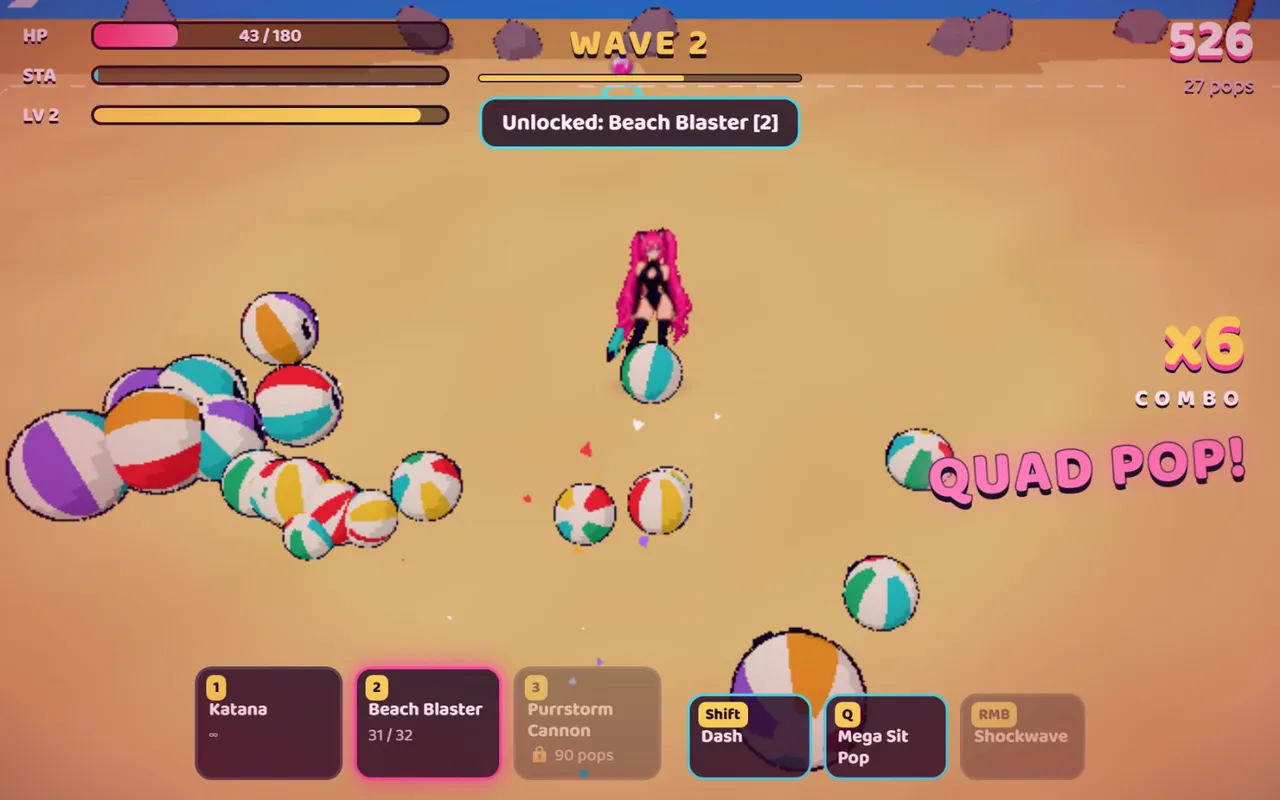
A 2D pixel-art beach brawler that runs in the browser, written in Python.
Open kittysbeachballfantasy.comHow it works
- Role
- Game design, development and hosting
- Status
- Live. Free to play in the browser.
- Platform
- Web, keyboard and mouse
- Stack
- Python, pygame, pygbag (WebAssembly), Flask, MariaDB, IIS
The problem
I made this game for my wife, Kitty. It had to open from a link, with nothing to download or install.
The game is written in Python, which does not normally run in a browser, so the build compiles it to WebAssembly and the same code runs in a tab.
What I built
- An arcade brawler. Pop and squish waves of beachballs before they overrun you: spiked, shielded, charging and elite ones, then a boss.
- Progression. Combos, critical hits and XP. Each level-up offers three upgrades to choose from, and shells buy random boosts from the beach crate.
- Three cats to play. Plus achievements and daily challenges.
- Accounts and saves. Progress is saved to an account, and a shared leaderboard tracks the best scores. Guests save in the browser.
- Play together. A solo queue and a party queue with invites.
How it works
The Python game never talks to the network itself. The web page around it does, and the two pass state back and forth through a handful of JavaScript functions.
Page
The web pageHandles sign-in, the queue, the lobby and music, and makes every network callGame
Python in WebAssemblypygame at 1280 by 720 with an async main loop. It hands input and scores to the page and takes back saves and multiplayer stateAPI
Flask on WaitressAccounts, saves and the leaderboard. Session tokens are random and stored only as hashesMatch server
A separate Python processRuns each multiplayer match at 60 ticks a second. Browsers send inputs and receive snapshots over a WebSocketData
MariaDB13 tables for accounts, sessions, parties, saves and scores. It stores lasting data only, never the live simulation
Hard problems and the decisions made
The match server froze on the first player
Problem As soon as one player joined over WebSocket, the server stopped. One function took a lock and then called another that asked for the same lock.
Decision Make the lock re-entrant.
Result A one-line fix, found by reading where the thread was stuck.
Multiplayer that jittered
Problem Enemies jumped around and movement stuttered. Several causes were stacked on top of each other.
Decision Apply a snapshot only when its version is new. Match each enemy to its previous position by kind and distance, not by list index. Predict positions between snapshots. Remove a fixed sleep that capped the snapshot rate.
Result Enemies stop jumping when one of them dies, and motion is smooth between snapshots.
Scores that could be made up
Problem A browser game can send any score it likes.
Decision The leaderboard takes score, wave and kills from the server’s own game state and rejects a submitted score that is higher. Sign-in and score submission are rate limited.
pygame in a browser tab
Problem Music played through pygame was unreliable in the browser, the hidden game canvas stole keyboard input from the sign-in fields, and uncompressed sound made the download heavy.
Decision Play music with the page’s own audio, fix the focus handling, and ship compressed audio only.
Result The sound files went from 94 MB to about 7 MB.
The build that shipped the wrong file
Problem Gameplay changes were made in one source file while the web build packaged another, so the live game had none of them.
Decision Change the file the build actually packages, and check the contents of the live archive after every deploy.
The stack, and what each part is for
- Python and pygame
- The game itself, with one async main loop.
- pygbag
- Compiles the game to WebAssembly so the same code runs in a browser tab.
- Flask on Waitress
- The API for sign-in, saves and the leaderboard. Passwords are hashed with PBKDF2 and a per-user salt.
- WebSocket match server
- Server-run game logic. WebSocket was chosen for browser support.
- MariaDB
- Lasting data only. The design notes rule it out as a bus for the real-time simulation.
- IIS and PM2
- IIS serves the game and PM2 keeps the backend running. Restarts are limited to this one site so the others on the server stay up.
Screens

Timeline and what is next
- Mar 11, 2026First commit: the game, sign-in and a leaderboard
- Mar 13, 2026Hosted, with saved progress
- Mar 17, 2026Dedicated match server
- Apr 6, 2026Multiplayer finished, more content and a new title screen
- Oct 16, 2026Security pass: server-checked scores and rate limits
- Oct 19, 2026Discord sign-in on kittysbeachballfantasy.com
- NextOn the roadmap: touch controls, public matchmaking and a settings screen
Status and links
Live. Free to play in the browser.